
DTVi Device Configuration Page
A redesign initiative to streamline the Digital Sales to increase progression rate and sales growth while developing and aligning with DIRECTV's Fusion Design System. This is how my team improved the purchasing experience leading to an increase of 23% revenue sales growth.

Overview
Objective
To enhance DIRECTV customer experience through a comprehensive redesign of the device configuration page with the goal of:
Increasing the upsell conversion rates
Boosting click-through rate for promotional content
Driving higher checkout rates and overall revenue
What role do I play in the team, and how do I collaborate with others?
As the UX Designer, I collaborated on the end-to-end design process and seamlessly communicated with stakeholders to ensure clarity, business alignment and high-performance delivery.
This project involved the UX Research Team, Senior Lead Designer, Developers, Product Owner, Content Writer and Business Directors
Outcomes
DIRECTV progress within one month of release of the redesign initiative
23%
Sales growth in revenue increase
5,303
additional new customer signups
7%
increased close rate

Background
Business proposal
DIRECTV progress within one month of release of the redesign initiative.
Increasing the device attachment rate is critical to drive incremental revenue and strengthen customer retention across the DIRECTV platform.
Expanding DIRECTV customers to own a device introduces the customers to join the ecosystem, providing a differentiated customer experience using DIRECTV’s streaming platform
How does DIRECTV's device differentiate itself from other options in the market?
DIRECTV offers the Gemini device because it allows the company to provide a controlled and unified experience to integrate customer’s current TV satisfaction, live TV and current streaming apps in one place, along with key features like voice control, DVR integration, simplified billing.
The challenge
With increasing competition from digital-first streaming services, there’s a need to further engage users and increase sales of both existing subscribers and new customers. The current platform offers live TV and streaming services, but the device configuration page is not fully optimized to:
01
Highlight and upsell opportunities in an intuitive and engaging way
02
Guide users seamlessly toward higher-value packages, premium channels, or add-on services
03
Lack of information of the device and DIRECTV app
04
Provide clear and actionable call-to-action prompts to drive conversions
Solution
With a deep understanding of the user journey to keep in mind in the redesign initiative on both the Gemini device and DIRECTV platform, the key moments in customer experience include:
01
Onboarding-new subscribers should be introduced to upsell opportunities immediately after setup with relevant package recommendations
02
Content discovery: browsing content should naturally guide users toward higher-tier plans and premium channels
03
Checkout flow: the process of adding services or upgrading plans needs to be streamline and frictionless
Research & Design Spikes
Research goals
Discover how customers currently understand the device page and their behavior in progressing into checkout flow. What is the decision factor? What key points and information are they looking for? What’s the final decision-making for them?
Competitive analysis
Based on initial findings, the team analyzed competitors such as Roku TV, Apple TV, Amazon Firestick, Google chromecast to further explore the marketing approach of their streaming devices. What stood out the most when reviewing all of these services that many customers have previously brought up in user interviews? Information boggling
Actionable design approach
The actionable design approach is to provide a quick summary and state the key features of the device to entice the customers to take the device when it’s already included with the streaming packages.
Data collected
Qualitative data gathered through User Testing Interviews with at least 8 participants for each iteration process
-
Ensure compatibility and performance compared to other streaming devices?
-
How is this redesign going to drive an upsell and cross-sell opportunities?
-
How to increase customer’s stickiness and give DIRECTV more control the viewing experience which is essential in a highly competitive streaming landscape
Insights
The old designs need a revamp due to the following:

What are users saying?
I collaborated with the research team to understand user’s frustrations:

-
People don’t look at the learn more, they want to checkout as quickly as possible, they know what they want
-
“Too pretty” of a design looks like an ad to the customer, they ignore it
-
People think if they don’t take the device, they will lose the streaming service
New designs

Modern aesthetic vs simple design, simple was the most effective
The simpler tile designs proved to be the most effective, as they clearly guided shoppers through the product journey and helped them easily understand key features.
In contrast, the more visually elaborate designs were often mistaken as an ad, causing users to disengage and show less interest in exploring the device or app. This insight reinforced that clarity and usability are more important than aesthetics when it comes to driving user engagement.
A new space efficient look, increasing engagement
User testing revealed that shoppers were more engaged with the updated FAQ-style layout featuring a dropdown modal.
Participants showed strong interest in quickly finding specific product features. The more concise and scannable design helped users easily identify relevant information, increasing their desire to click through and explore each feature in more detail. This suggests that clear, streamlined content paired with an interactive layout supports deeper product discovery.

Previous designs


Previous designs

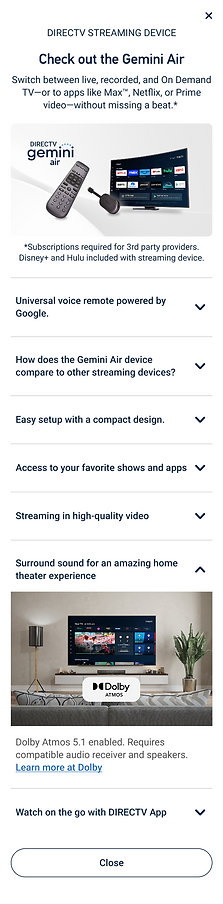


Wireframes and prototyping for hand-off:
Each screen was carefully reviewed for technical requirements and prototyped to confirm the interaction design was clear and feasible for both developers to implement and during user test sessions.